Project Description:
The purpose of my feature was to allow users react to books with emojis to show if the book made them feel happy, sad, etc. This is not as quick as a rating, but not quite a review, instead it just allows readers to express how the book made them feel in a simple manner. The program retrieves data from a backend API and displays it in an interactive UI. Users can:
- Add new items using an input field with an emoji selection feature.
- Update existing items by modifying their content and saving changes.
- Delete items when they are no longer needed.
- The UI dynamically updates based on user actions without requiring a page reload.
A combination of event listeners and API calls (GET, POST, PUT, DELETE) ensures that the frontend remains synchronized with the backend.
My project fulfills the CPT requirements of selection and iteration when adding reaction and updating reactions. When users delete a reaction, a for loop iterates through the existing reactions in the database. My code includes both inputs and outputs for when users add reactions, update reactions, etc.
Input:
My code recieves user input when:
Adding a reaction
    document.getElementById('addEmotionForm').addEventListener('submit', async (e) => {
        e.preventDefault();
        const userId = document.getElementById('userId').value;
        const bookDropdown = document.getElementById('bookDropdown');
        const selectedOption = bookDropdown.options[bookDropdown.selectedIndex];

        if (!selectedOption.value) {
            showStatusMessage('Please select a book.', false);
            return;
        }

        const bookData = JSON.parse(selectedOption.value);
        const bookId = bookData.id;
        const bookTitle = bookData.title;
        const authorId = bookData.author;
        const reactionType = document.getElementById('addReactionType').value;

        try {
            const response = await fetch(`${pythonURI}/api/emotion`, {
                ...fetchOptions,
                method: 'POST',
                headers: { 'Content-Type': 'application/json' },
                body: JSON.stringify({ user_id: userId, title_id: bookId, author_id: authorId, reaction_type: reactionType }),
            });

            if (!response.ok) throw new Error(await response.text());

            displayAddedEmotion(bookId, bookTitle, authorId, reactionType);
            showStatusMessage('Emotion successfully added!');
        } catch (error) {
            showStatusMessage(`Failed to add emotion: ${error.message}`, false);
        }
    });
Updating a reaction
    async function handleUpdateEmotion(event) {
        const userId = document.getElementById('userId').value;
        const emotionItem = event.target.closest('.emotion-item');
        const titleId = emotionItem.dataset.bookId;
        const authorId = emotionItem.dataset.authorId;

        const dropdown = document.createElement('select');
        dropdown.innerHTML = document.getElementById('addReactionType').innerHTML;
        dropdown.value = emotionItem.dataset.reaction;

        const submitButton = document.createElement('button');
        submitButton.textContent = 'Save';
        submitButton.onclick = async () => {
            const newReaction = dropdown.value;
            if (!newReaction) return;

            try {
                const response = await fetch(`${pythonURI}/api/emotion/update`, {
                    ...fetchOptions,
                    method: 'PUT',
                    headers: { 'Content-Type': 'application/json' },
                    body: JSON.stringify({ user_id: userId, title_id: titleId, reaction_type: newReaction }),
                });

                if (!response.ok) throw new Error(await response.text());

                emotionItem.dataset.reaction = newReaction;
                emotionItem.querySelector('.reaction-text').textContent = newReaction;
                showStatusMessage('Emotion successfully updated!');

                emotionItem.innerHTML = `
                    <span>📖 <b>${emotionItem.dataset.bookTitle}</b> by ${authorId} — Reaction: <span class="reaction-text">${newReaction}</span></span>
                    <div>
                        <button class="update-button">📝</button>
                        <button class="delete-button">🗑️</button>
                    </div>
                `;

                emotionItem.querySelector('.update-button').addEventListener('click', handleUpdateEmotion);
                emotionItem.querySelector('.delete-button').addEventListener('click', handleDeleteEmotion);
            } catch (error) {
                showStatusMessage(`Failed to update: ${error.message}`, false);
            }
        };
Deleting a reaction
async function handleDeleteEmotion(event) {
        const userId = document.getElementById('userId').value;
        const emotionItem = event.target.closest('.emotion-item');
        const titleId = emotionItem.dataset.bookId;
        const authorId = emotionItem.dataset.authorId;

        if (!confirm(`Delete emotion for "${emotionItem.dataset.bookTitle}"?`)) return;

        try {
            const response = await fetch(`${pythonURI}/api/emotion/delete`, {
                ...fetchOptions,
                method: 'DELETE',
                headers: { 'Content-Type': 'application/json' },
                body: JSON.stringify({ user_id: userId, title_id: titleId, author_id: authorId }),
            });

            if (!response.ok) throw new Error(await response.text());

            emotionItem.remove();
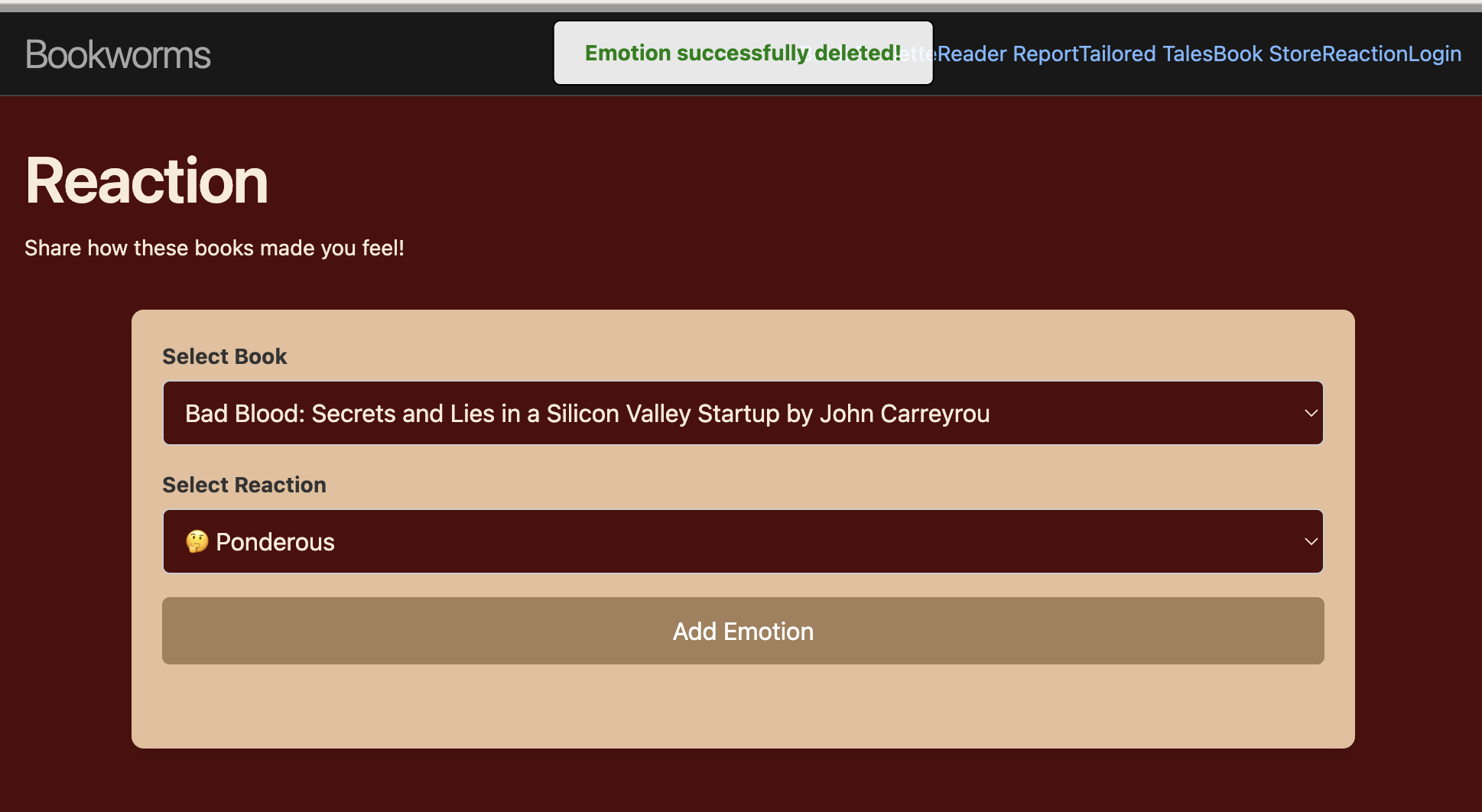
            showStatusMessage('Emotion successfully deleted!');
        } catch (error) {
            showStatusMessage(`Failed to delete: ${error.message}`, false);
        }
    }
Procedure:
This procedure adds a reaction with a descriptive name add_emotion(), and has several parameters, including user_id, reaction_type, title_id, and author_id.
@emotion_api.route('', methods=['POST'])
def add_emotion():
    data = request.json

    user_id = data.get("user_id")
    reaction_type = data.get("reaction_type")
    title_id = data.get("title_id")
    author_id = data.get("author_id")

    try:
        # Create and add the message_reaction
        message_emotion = Emotion(reaction_type=reaction_type, user_id=user_id, title_id=title_id, author_id=author_id)
        message_emotion.create()
        return jsonify({'message': 'Emotion added successfully to post'}), 201
    except Exception as e:
        return jsonify({'error': 'Failed to add emotion', 'message': str(e)}), 500
Sequencing
Functions execute in a structured order, ensuring that each step (e.g., fetching data → validating input → updating UI) follows logically.
document.addEventListener('DOMContentLoaded', async () => {
    // Step 1: Fetch books from API
    const books = await fetchBooks();
    populateBookDropdown(books);  // Step 2: Populate dropdown
});

async function fetchBooks() {
    try {
        const response = await fetch(`${pythonURI}/api/wishlist/books`);
        if (!response.ok) throw new Error(`Failed to fetch books: ${response.status}`);
        return await response.json();  // Step 3: Return book data
    } catch (error) {
        console.error('Error:', error);
        return [];
    }
}

document.getElementById('addEmotionForm').addEventListener('submit', async (e) => {
    e.preventDefault();

    const userId = document.getElementById('userId').value;
    const bookDropdown = document.getElementById('bookDropdown');
    const selectedOption = bookDropdown.options[bookDropdown.selectedIndex];

    if (!selectedOption.value) {
        showStatusMessage('Please select a book.', false);
        return;
    }

    const bookData = JSON.parse(selectedOption.value);
    const reactionType = document.getElementById('addReactionType').value;

    try {
        // Step 4: Send request to add emotion
        const response = await fetch(`${pythonURI}/api/emotion`, {
            method: 'POST',
            headers: { 'Content-Type': 'application/json' },
            body: JSON.stringify({
                user_id: userId,
                title_id: bookData.id,
                author_id: bookData.author,
                reaction_type: reactionType,
            }),
        });

        if (!response.ok) throw new Error(await response.text());

        // Step 5: Update UI after successful API response
        displayAddedEmotion(bookData.id, bookData.title, bookData.author, reactionType);
        showStatusMessage('Emotion successfully added!');
    } catch (error) {
        showStatusMessage(`Failed to add emotion: ${error.message}`, false);
    }
});
- fetches books from backend
- populates the dropdown with books
- handle form submission and validate user input
- sends API request to add a reaction
- update the UI dynamically upon success
Selection: if else
- first if - checks if a book is selection, if not, an error is returned and procedure stops
- second if - chekcs if a reaction is selected, if not, execution is stopped
- inside try block - if request fails, an error is shown, if successful, the UI updates
- catch - it handles the failure if an error occures
Iteration: for loop
books_list = [{'id': book.id, 'title': book.title, 'author': book.author} for book in books]
This list comprehension in backend iterates over all the books retried from the database and formats them into a list of dictionaries.
List
I used a list for my initial data in the database:
emotions = [
        Emotion(user_id=1, reaction_type='😢', title_id="Catcher in the Rye", author_id="J.D."),
        Emotion(user_id=1, reaction_type='❤️', title_id="Hunger Games", author_id="Suzanne Collins")
    ]
Output:
Frontend:
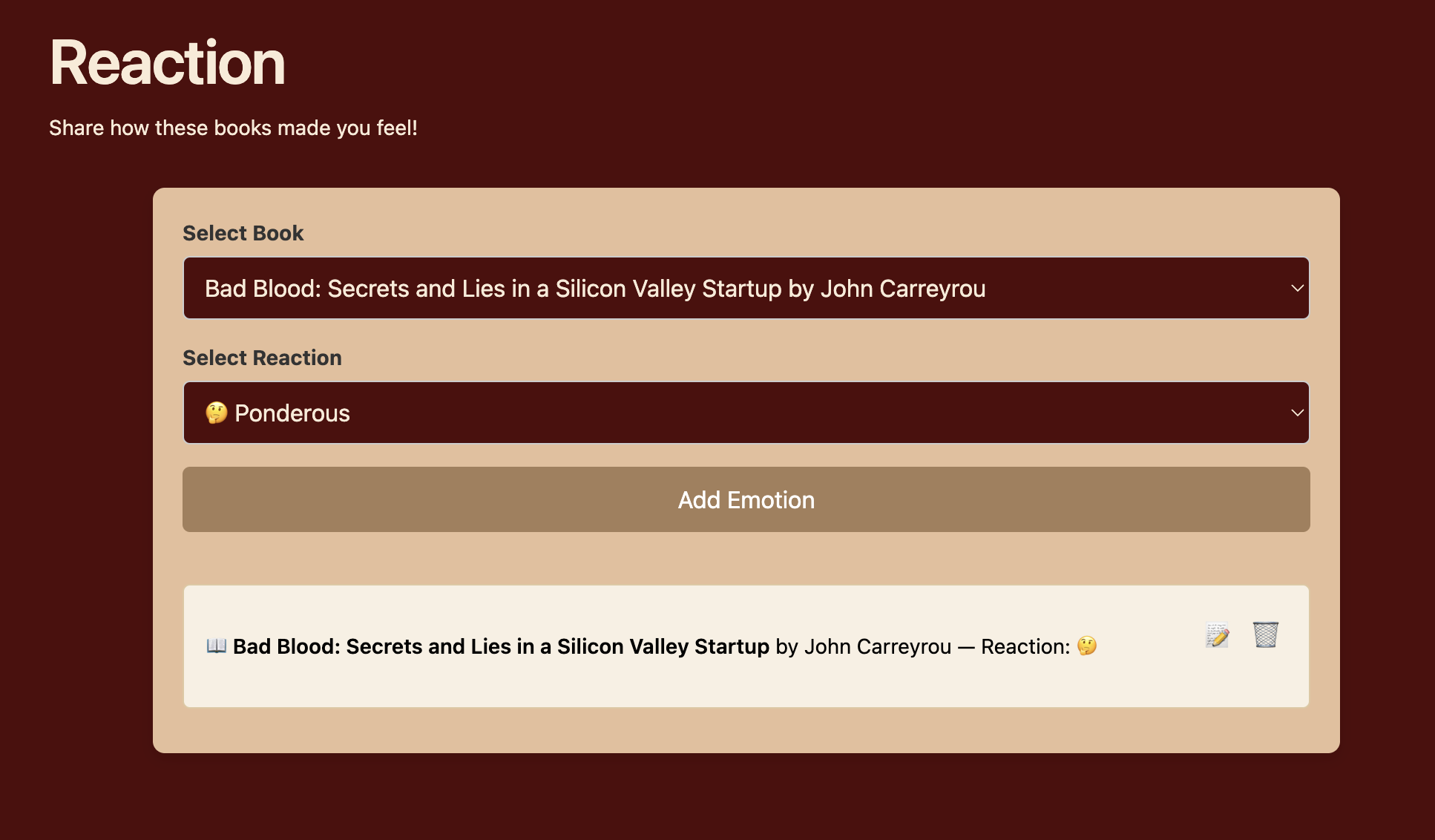
function displayAddedEmotion(bookId, bookTitle, authorId, reactionType) {
        const addedEmotionsDiv = document.getElementById('addedEmotions');
        const emotionItem = document.createElement('div');
        emotionItem.className = 'emotion-item';
        emotionItem.dataset.bookId = bookId;
        emotionItem.dataset.authorId = authorId;
        emotionItem.dataset.reaction = reactionType;

        emotionItem.innerHTML = `
            <span>📖 <b>${bookTitle}</b> by ${authorId} — Reaction: <span class="reaction-text">${reactionType}</span></span>
            <div>
                <button class="update-button">📝</button>
                <button class="delete-button">🗑️</button>
            </div>
        `;

        addedEmotionsDiv.appendChild(emotionItem);
        emotionItem.querySelector('.update-button').addEventListener('click', handleUpdateEmotion);
        emotionItem.querySelector('.delete-button').addEventListener('click', handleDeleteEmotion);
    }
Backend:
return jsonify({"message": "All reactions for the user have been reset"}), 200
except Exception as e:
    return jsonify({'error': 'Failed to reset reactions', 'message': str(e)}), 500